Administrators can edit colleague names
The administrator can now edit the first and last names of colleagues directly from the People page.
🐛 More logical coloring for the selected day during the booking process.
🐛 Some other minor bugs have been fixed.
Add Whatspot to your mobile home screen
We are constantly improving the mobile version. Add the Whatspot icon to your mobile desktop for quick app-like access.
Add short descriptions to spots + public category booking
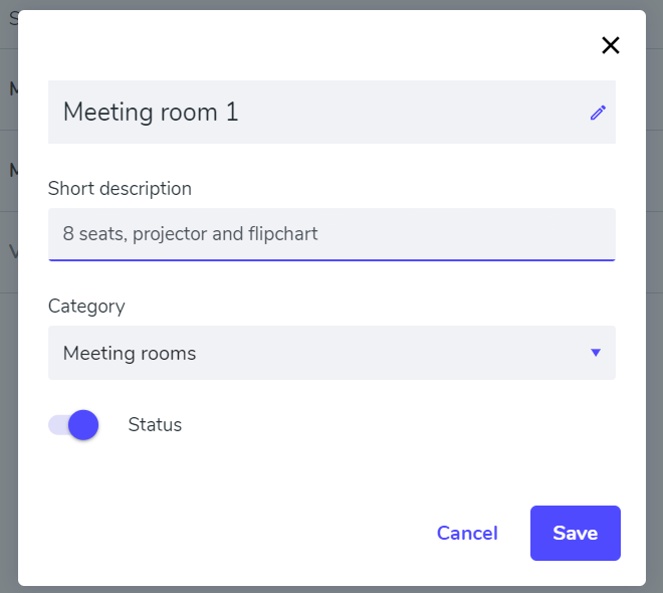
Add a short description to each spot (e.g. "8 seats, projector and flipchart") that's visible during the booking process. External users can also now book public resources.
⚙️ In spot settings, add a short description like "8 seats, projector and flipchart" — visible during the booking process.
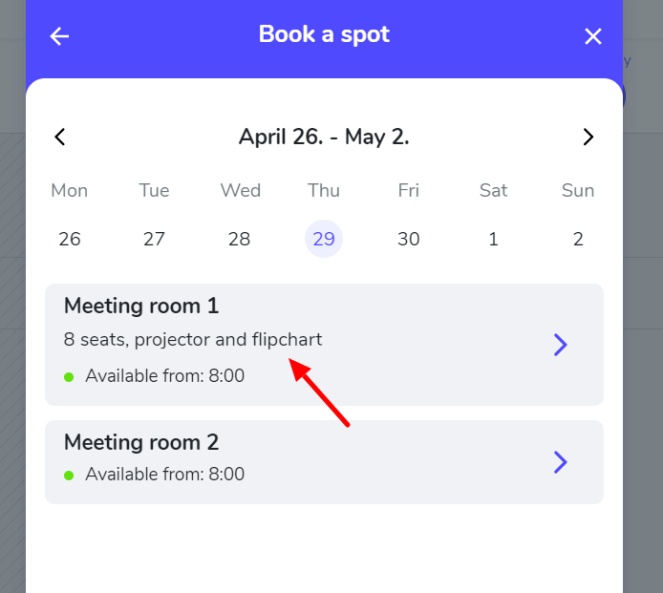
⭐ An external user can now reserve your company resources — just make the desired category public and share a link.
Turn off email notifications + rejection notes + faster Spots page
You can now turn off email notifications in Edit Profile. Rejection notes are automatically included in notification emails, and the Spots page loads significantly faster.
⚙️ Turn off email notifications in Edit Profile → "Receive email notifications". Notifications will still appear under the bell icon in the app.
🐛 When rejecting a reservation, a note is now automatically sent in the notification email.
🐛 The Spots page now loads significantly faster.
Category owners can add rejection/deletion notes
The category owner can now add a note with the reason for rejecting or deleting a reservation. The user receives this in an email notification.
⚙️ The category owner can now add a note showing the reason for rejecting or deleting a reservation. The user will receive this via email.
🐛 Adjusted the insertion of text into a note when creating a reservation.
🐛 When creating a reservation, category names are now correctly indented.
🐛 Some other minor bugs have been fixed.