Book spots during working hours only + image optimisation
Restrict bookings to working hours only, so spots can't be reserved outside business hours. Images in the booking process are also now optimized.
⭐ Working hours booking — Set the option to only allow bookings during working hours.
⚙️ Optimized image display during the third step of the booking process.
🐛 Fixed bug when displaying the daily calendar.
🐛 Some minor bugs have been fixed.
Sunday as first day of week + quick Book button + feedback form
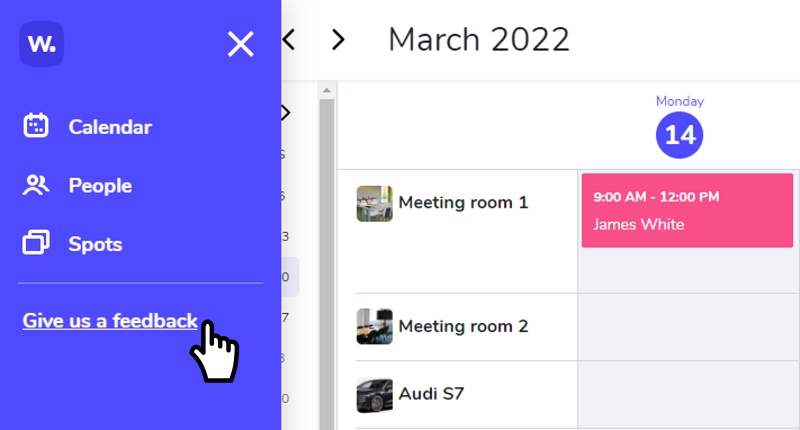
Set Sunday as your week's first day. The spot detail page now also shows a Book button and nearest available date. Plus: send feedback directly from the main menu.
⭐ Sunday as first day — You can now set Sunday as the first day of the working week.
⭐ Quick Book button — The Book button and nearest available free date are now shown on the spot detail page.
⚙️ You can now submit feedback via a form directly from the main menu.
🐛 Fixed error in recurring event.
🐛 Fixed bug in the notification center.
🐛 Some minor bugs have been fixed.
Public users can now cancel reservations from email
External/public users can now cancel their reservation directly from the email notification — no login required.
⭐ The spot image and information can now be found during the booking process and in the dialog box header.

🐛 Some minor bugs have been fixed.
Whatspot now speaks Portuguese + edit spot from calendar
Portuguese is now available as an app language. Admins can also access spot editing directly from the calendar view.
⭐ 🇵🇹 The Whatspot app speaks Portuguese. Set the language in Edit Profile → App Language.
⭐ The administrator can now access "edit spot" directly from the calendar.
🐛 The vertical scroll bar on the spots page has been removed.
🐛 Some other minor bugs have been fixed.
View spot images in the calendar + easier image upload
Click on a spot title in the daily or weekly calendar to see its image. Uploading images is now easier and more intuitive too.
⚙️ Uploading an image for a spot is now even easier and more intuitive.
⚙️ Any admin can now pay for a subscription.
🐛 Fixed a bug related to inserting long texts into booking notes.
🐛 The month name in the day view is now displayed correctly according to the language setting.