Many companies face the same question: Is Google or Outlook Calendar enough for booking meeting rooms, or do we already need a dedicated booking system?
A calendar usually works fine at first. But as the company grows, shifts to hybrid work, shares spaces across multiple teams, or opens them to external visitors and collaborators, conflicts, confusion, and unnecessary admin start to pile up.
This article explains when a calendar stops being enough, what the difference is between a regular calendar and a dedicated booking system, and in which situations it makes sense to manage spaces centrally with a specialized tool.
Table of Contents
What is a meeting room booking system
How meeting room booking works in practice
When Google or Outlook Calendar stops being enough
What is the difference between Outlook / Google Calendar and a booking system
When it makes sense to use a dedicated booking system
Is a booking system suitable for small companies too
Calendar and booking system are not mutually exclusive
Where a specialized solution fits in
Summary
What is a meeting room booking system
Meeting room booking system is software designed to manage, control, and book physical spaces in an office or organization. It allows employees and external users to easily find an available room, book it for a specific time, and avoid scheduling conflicts.
Unlike a regular calendar, its primary purpose is managing space utilization, not just tracking meetings. It works with room capacity, equipment, access rights, time rules, and approval workflows.
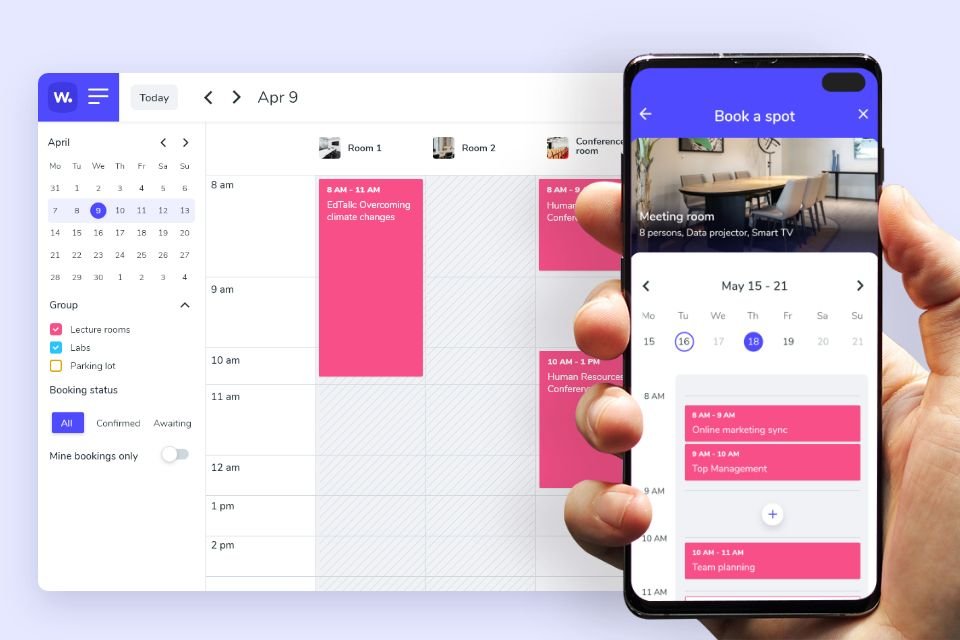
Web and mobile interface of a meeting room booking system - Whatspot
How meeting room booking works in practice
From a regular user's perspective, the process is simple:
- the user selects the date and time of the meeting,
- the system shows only genuinely available rooms,
- they can filter by capacity, equipment, or location,
- the booking is made without the risk of a conflict,
- the event syncs with the company calendar (Google / Outlook).
From the space manager's perspective, the system also:
- monitors conflicts and clashes automatically,
- applies usage rules (e.g. who can book what),
- enables approval workflows for selected spaces,
- provides an overview of occupancy and resource utilization.
When Google or Outlook Calendar stops being enough
Calendars like Google or Microsoft Outlook are great tools for scheduling people's time. But they are not designed for managing shared physical spaces.
Typical signs that a calendar is no longer enough:
- meeting rooms are shared across multiple teams or departments,
- spaces are also used by external visitors, partners, or the public,
- it's unclear who has the right to book a room,
- there's no clear overview of actual room availability,
- conflicts occur or the admin has to intervene manually,
- bookings need to be managed using rules or approval workflows.
In these situations, the problem doesn't come from the people — it comes from a tool that wasn't designed for this purpose.
What is the difference between Outlook / Google Calendar and a booking system
| Area | Calendar (Google / Outlook) | Booking system |
|---|---|---|
| Primary purpose | Scheduling meetings and people's time | Managing spaces and resources (rooms, desks, parking) |
| Availability overview | Limited, often inaccurate for shared spaces | Real-time availability |
| Conflict prevention | Partial, often reliant on user discipline | Automatic conflict detection and blocking |
| Access rights | Basic (calendar sharing, invitations) | Detailed levels (roles, teams, external users, category restrictions) |
| Usage rules | No, or very limited | Yes – time limits, maximum duration, frequency, who can book what |
| Booking approval | No, approval is handled manually by email or verbal agreement | Yes – approval workflow for selected rooms or categories |
| External users | Rarely supported, impractical | Yes – public or shared links for external users and visitors |
| Admin overview | Minimal, no statistics | Detailed usage statistics, data for decision-making and optimization |
A calendar lets you assign a room to a meeting. A booking system lets you actively manage your spaces.
When it makes sense to use a dedicated booking system
A dedicated booking system is the right choice when:
- you need to control who, when, and under what conditions can use spaces,
- there are different permission levels (employees, management, external users),
- some bookings require admin approval,
- spaces have time restrictions or usage rules,
- you want visibility into the efficiency of room and resource utilization.
A booking system helps managers shift from firefighting to managing and optimizing resources.
Is a booking system suitable for small companies too
Yes. Small companies often have less room for error than large organizations. As soon as they share a few rooms among several people or allow external collaborators to book, chaos can arise very quickly.
A booking system helps small companies:
- set clear rules from the very beginning,
- eliminate manual intervention and informal arrangements,
- maintain an overview without unnecessary admin overhead.
Calendar and booking system are not mutually exclusive
Google and Microsoft calendars remain important tools for scheduling meetings. A booking system is their natural complement, addressing the physical reality of the office.
The calendar answers the question of when people will meet. The booking system answers where and under what conditions.
Where a specialized solution fits in
If your organization needs to:
- manage bookings across teams and external users,
- set rules, permissions, and approval workflows,
- connect bookings with calendars and mobile access,
- have visibility into space utilization over time,
then it makes sense to use a dedicated meeting room booking system. One example of such a solution is Whatspot, which combines simple user experience with powerful space management features for admins.
Find out more on the page dedicated to meeting room booking.
Summary
- A calendar handles scheduling people's time.
- A booking system handles managing shared spaces.
- As soon as spaces are shared across multiple teams or external users, they require clear rules, permissions, and visibility.
- A dedicated booking system helps prevent conflicts, saves time, and gives admins data to make decisions.
- That's why many companies today combine both approaches – calendars for scheduling meetings and a booking system as the foundation for effective meeting room management.