12-hour time format support
The app can now display time in the 12-hour (AM/PM) format — toggle it in your profile settings.
⚙️ Adding a reservation is now possible even when the approval process is turned off.
🐛 Fixed turning on and off email notifications.
Dutch language + global permissions + monthly calendar view
Whatspot now speaks Dutch. New users can automatically get access to all spots, and there's a new monthly calendar overview of your bookings.
⭐ 🇳🇱 Whatspot now speaks Dutch. Set the language in Edit Profile → App Language.

⭐ Global permissions — Set permissions globally so all new users automatically get access to all spots.
⭐ Monthly calendar view — Get a comprehensive overview of your bookings in the monthly calendar.
🐛 Fixed date and time display for the Western Hemisphere.
🐛 Some other minor bugs have been fixed.
Whatspot now speaks German
The Whatspot app and website are now available in German. Set the language in Edit Profile → Application Language.
⭐ 🇩🇪 Whatspot app and the website now speak German. Set language preferences in Edit Profile → Application Language.

Weekly calendar without weekends + admin improvements
View the weekly calendar with weekends hidden for a cleaner overview of working days. Admins can also remove deactivated spots, categories, and users.
⭐ Hide weekends — View the weekly calendar without the weekend for a better overview of your working days.
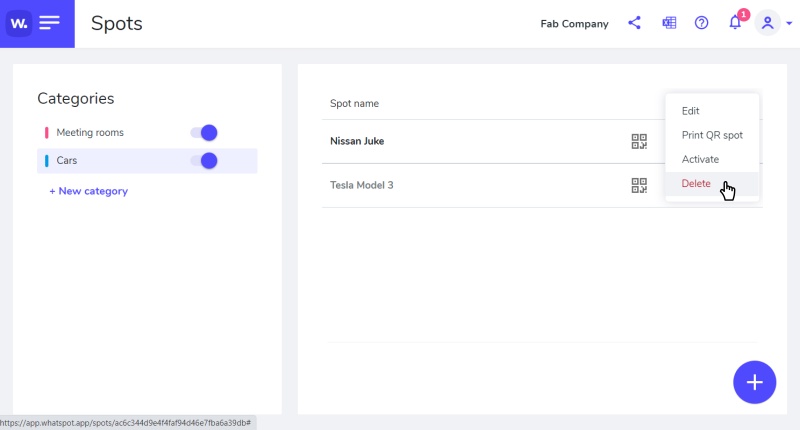
⚙️ Admin can now remove a deactivated category or spot on the Spot page, and remove a deactivated user on the People page.
⚙️ The icons for switching between calendar and agenda have been replaced by a drop-down list.
⚙️ The header on the People page is now anchored for better visibility.
🐛 Fixed iPhone view.
🐛 Some other minor bugs have been fixed.
Search for help directly in the app
You can now search for help and view specific guidance directly within the Whatspot application.
⚙️ Enhanced event name when inserted into your personal calendar.
🐛 Minor improvements.